master Backup Out of Date? Here’s How to Check It
You added a login for the new monitoring vendor on Tuesday, granted it sysadmin so its agent could run its checks, and moved on. A linked server went in the same week, for a reporting job nobody wants to touch by hand. Then somebody asked the only question that matters: if this server died tonight, would any of that come back? That's what a master backup out of date actually costs you, and last night's green checkmark on the backup job does not answer it.
How do I know if I have a master backup out of date on SQL Server? A master backup out of date does not mean the backup job failed. It can succeed every night and still miss every login, server role grant, linked server, credential, endpoint, certificate, or startup procedure created since it last ran. The only way to know is to compare the backup's timestamp against the newest server level change, not against a schedule.
The instinct is to check the backup job history. Ran on schedule, completed without error, done. Not quite. A completed backup only proves the job executed. It says nothing about what changed on the server between then and now. Database Health Monitor's master Backup and Rebuild Readiness report exists because 'the backup succeeded' and 'the backup is still current' are two different claims, and only one of them protects you.
What actually matters isn't when the backup ran. It's what is newer than it. Every login created, every server role grant, every linked server, credential, endpoint, certificate, and startup procedure added since that backup finished is something a restore of it would not bring back. That's a fact about content, not a fact about scheduling, and it's the only number worth trusting at three in the morning.
Seeing a master backup out of date at a glance
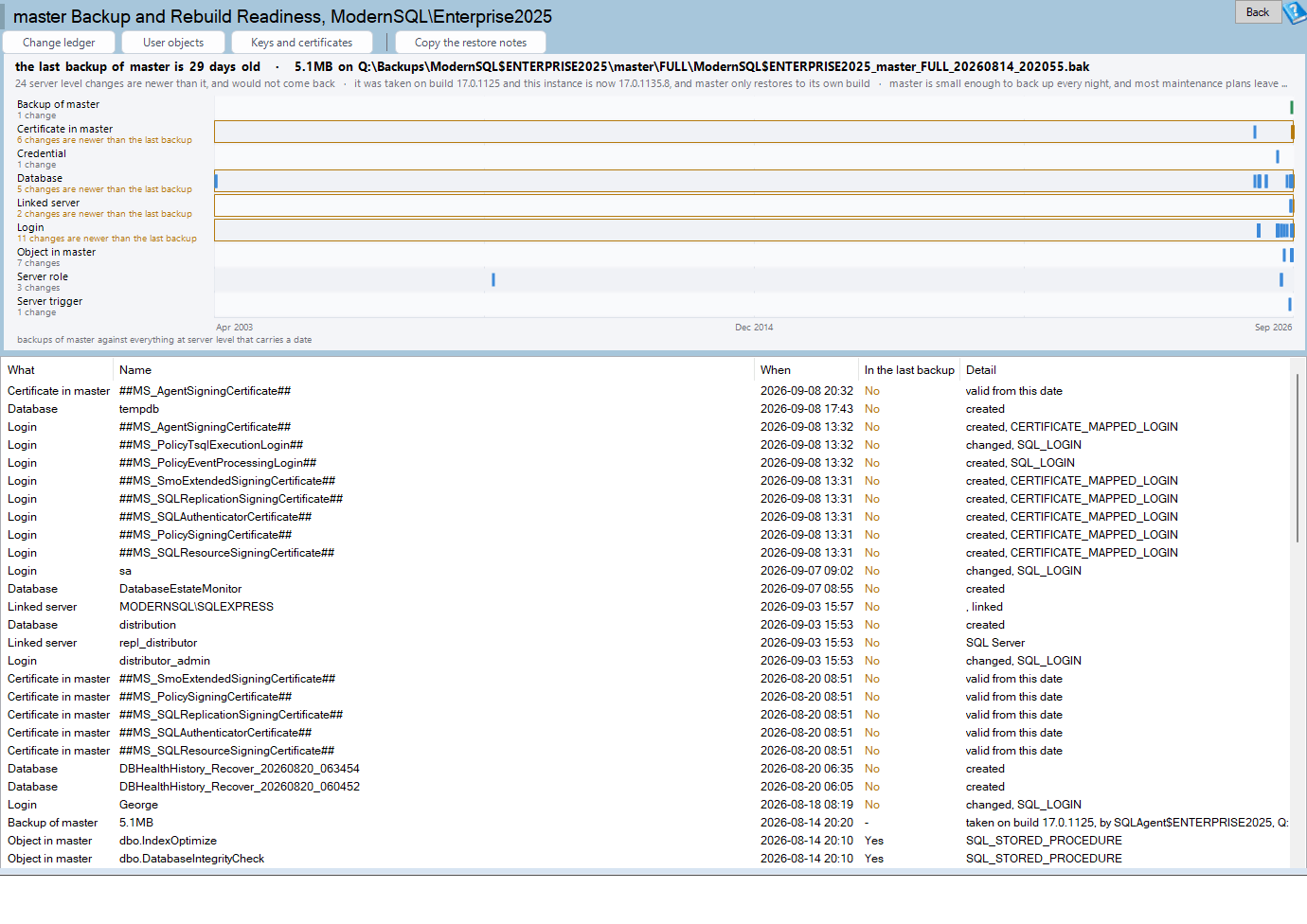
master Backup and Rebuild Readiness is one of the reports in Database Health Monitor. It runs against your own servers, and it takes about a minute to have this same screen open on one of them.
Backups of master sit in one lane. Every kind of server level change gets a lane of its own, drawn against that same timeline, so the distance between the last backup and the newest change is something you see rather than something you calculate. Each row also carries an In the last backup column that answers yes or no directly, which is the entire reason the page exists.
Two changes even this report can't date
Not every kind of change carries a timestamp. Role membership is one of them. Adding a login to 'sysadmin' does not touch any create or modify column in 'sys.server_role_members', because that catalog view doesn't have one. A login could have been added five minutes ago or five years ago, and the metadata looks identical either way.
Endpoints have the same blind spot from a different angle. 'sys.endpoints' records what an endpoint does and its current state, but nothing about when anyone created it. Rather than leave those rows blank and let you assume nothing changed, the report says plainly that it can't tell, and points toward master Change Ledger, which reads the default trace instead and can put a real date on both.
Reading the chart: lanes instead of dates
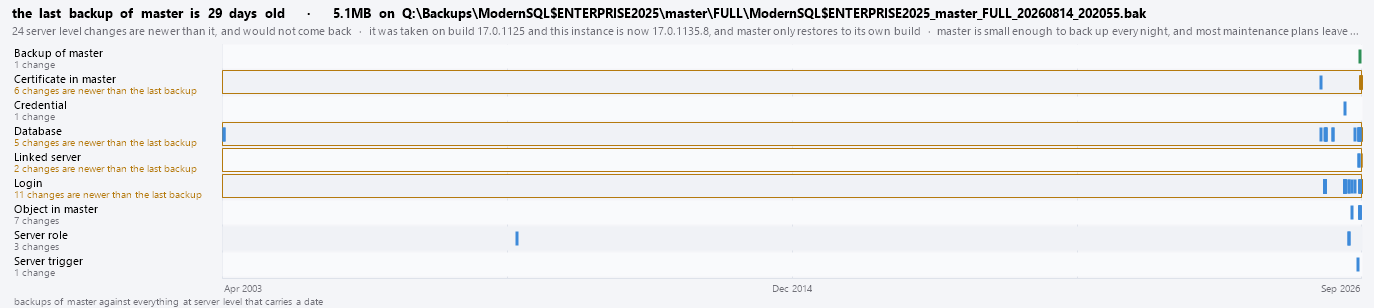
The chart is what makes the comparison physical. Backups of master run along the top lane. Every other lane is one kind of server level change, drawn on the same axis, so anything sitting to the right of the last backup mark is something a restore would leave out. A count under each lane label means you aren't eyeballing dozens of marks trying to find the ones that matter.
Reading the grid, and the build a restore actually needs
The grid underneath lists everything the chart plots, newest first, with the master backup itself included as a row like any other. Above that row, every item answers no in the In the last backup column. Below it, every item answers yes. A Detail column fills in why a given row has no date at all, or what a rebuild of master would cost you if that specific item were lost.

| Column | What it tells you |
|---|---|
| What | The kind of object: a login, a role grant, a linked server, a credential, an endpoint, a certificate, or a startup procedure. |
| Name | The specific object. |
| When | Its create or modify date, for the object types that have one. |
| In the last backup | Yes or no. The column the whole report is built around. |
| Detail | Why an item has no date, or what a rebuild would cost you if it's lost. |
Being current is only half of a real restore. The other half is that a master backup can only be restored onto an instance running the exact same build, not just the same major version. The report carries that build number alongside the edition, the collation, and the single user start syntax with the '-m' switch, and a toolbar button copies all of it as a note you can paste straight into a change ticket.
What the toolbar opens next
The report doesn't try to be the only screen you need. A Change ledger button opens master Change Ledger directly, for the two blind spots above. A User objects button opens master User Objects, the other thing a rebuild of master loses that isn't captured here. A Keys and certificates button opens master Keys and Certificates, so you can check whether those were ever exported anywhere outside the database that protects them.
Where the numbers come from
None of this is inferred. The backups come from 'msdb.dbo.backupset'. Logins come from 'sys.server_principals', which actually carries a 'create_date' and a 'modify_date'. Linked servers and credentials carry a 'modify_date' of their own, from 'sys.servers' and 'sys.credentials'. Certificates and symmetric keys come from 'sys.certificates' and 'sys.symmetric_keys', and startup procedures come from 'sys.procedures' filtered to 'is_auto_executed'. Every yes or no on the grid traces back to one of those.
master holds more than logins and certificates. Its data and log files need the same attention any other database's do, and Why Autogrowth in Percent Slows SQL Server Down is worth a look if you haven't checked how master's files grow. For the full column reference on this report, including every catalog view behind each lane, see the master Backup and Rebuild Readiness documentation.
What to check on your own server
- Check 'msdb.dbo.backupset' for the last full backup date of master
- Query 'sys.server_principals' for any login with a 'create_date' or 'modify_date' after that backup
- Check 'sys.servers' and 'sys.credentials' for a 'modify_date' newer than the backup
- Review 'sys.server_role_members' and 'sys.endpoints' by hand, since neither carries a date column
- Compare the build, edition, and collation from 'SERVERPROPERTY' against the instance you would restore to
Try Database Health Monitor Today
It turns 'is my master backup still good enough' from a guess into a yes or no, by showing you everything created since the backup that a restore would not bring back. Database Health Monitor shows it on every instance you connect, in the time it takes to open the report.
Download Database Health Monitor and run the master Backup and Rebuild Readiness report against your own server. There is nothing to configure first, and you will know inside a few minutes whether it tells you something you did not already know.
Related reading: Is This Query Slower Than Normal? Ask Its Own History. A look at how per-query control limits built from Query Store history separate a real slowdown from a query's ordinary wobble, and what to check once one is flagged.
Related reading: Is a SQL Server Query Regression Statistically Significant?. A companion piece runs the same kind of question through Change Significance's precision funnel, turning a query's own run-to-run noise into a hard threshold so a scary percentage and a real regression stop looking like the same thing.