Quick Scan Report – Error Log Maximum Size
What this check looks for
The ErrorLogSizeInKb registry value, which sets the size at which SQL Server starts a new error log file. The finding is raised when it is small enough to cause frequent rollovers.
Why it matters
How far back your error log goes is the product of two settings, and this is one of them.
history retained = rollover size x number of files retainedWith the size set to 10 MB and the default of 6 files retained, the maximum history is 60 MB of log entries. On an instance writing a few thousand entries a day, that can be less than a week.
Why that matters is the question you ask the log. The error log is consulted after something has happened, and the useful question is usually historical:
- “When did this start?”
- “Did this happen before the change last month?”
- “Was there an I/O warning before the corruption was reported?”
- “How long have these failed logins been occurring?”
None of those can be answered by a log that only covers four days. And the moment you discover the history is gone is invariably the moment you needed it.
There is a second, subtler effect. A small rollover size means frequent rollovers, and every rollover consumes one of your retained files. On an instance with the default six files, a busy day can cycle through several of them, so the history is not just short but unpredictably short.
The two settings interact and are usually both wrong together:
| Setting | Default | Sensible |
|---|---|---|
ErrorLogSizeInKb |
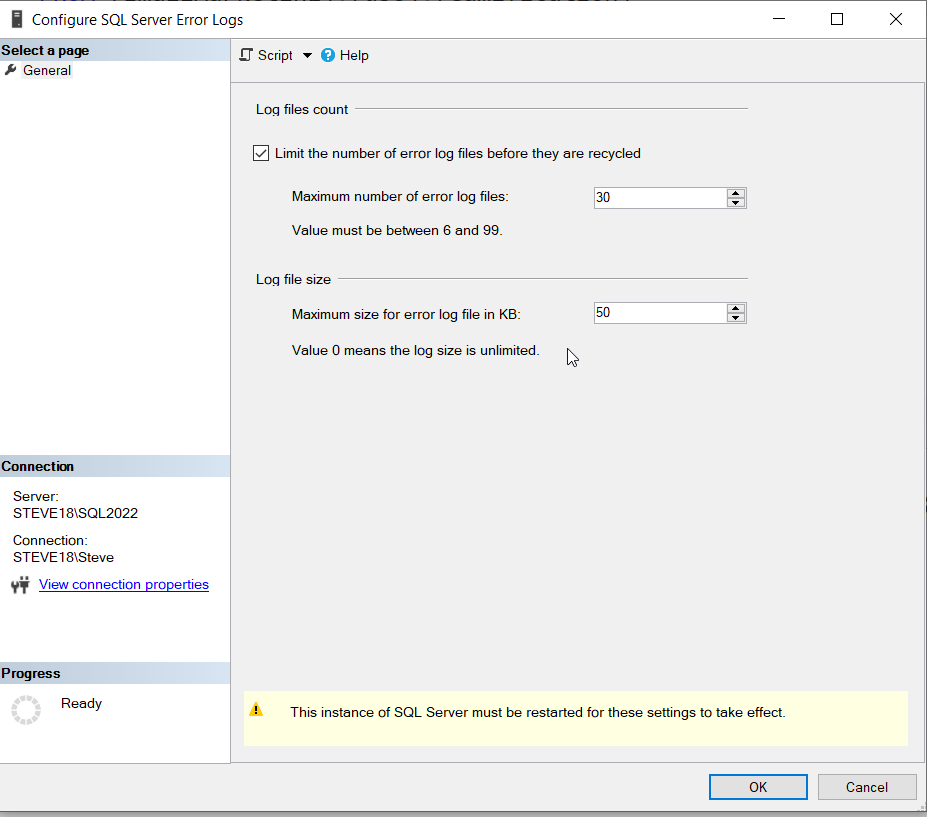
Not set, meaning unlimited size | 51200 (50 MB) |
NumErrorLogs |
6 | 30 |
Note that the default for the size is actually “no limit”, which produces the opposite problem: one enormous file that never rolls until the service restarts, which is the huge error log finding. So the two findings sit either side of the same setting, and the right answer is a moderate size with generous retention.
A moderate size is better than no limit because it keeps each individual file readable. sp_readerrorlog reads sequentially, so a 50 MB file returns in a moment and a 5 GB one does not.
How to confirm it yourself
The two settings together, which is the only way they make sense:
DECLARE @sizeKb INT, @numLogs INT;

EXEC master.dbo.xp_instance_regread
     N'HKEY_LOCAL_MACHINE', N'Software\Microsoft\MSSQLServer\MSSQLServer',
     N'ErrorLogSizeInKb', @sizeKb OUTPUT;

EXEC master.dbo.xp_instance_regread
     N'HKEY_LOCAL_MACHINE', N'Software\Microsoft\MSSQLServer\MSSQLServer',
     N'NumErrorLogs', @numLogs OUTPUT;

SELECT ISNULL(@sizeKb, 0)                      AS [rollover_size_kb],
       ISNULL(@sizeKb, 0) / 1024.0             AS [rollover_size_mb],
       ISNULL(@numLogs, 6)                     AS [files_retained],
       ISNULL(@sizeKb, 0) / 1024.0 * ISNULL(@numLogs, 6) AS [max_history_mb];
A NULL size means no limit; a NULL file count means the default of 6. The max_history_mb column is the number that matters.
How much history you actually have right now, which is the empirical version of the same question:
EXEC sys.sp_enumerrorlogs;That lists every retained file with its size and the date range it covers. Read the oldest row’s start date. That is how far back you can look today.
How fast you are consuming it:
CREATE TABLE #errorLog (
    [LogDate]     DATETIME,
    [ProcessInfo] NVARCHAR(100),
    [Text]        NVARCHAR(MAX)
);

INSERT INTO #errorLog EXEC sp_readerrorlog 0;

SELECT CAST([LogDate] AS DATE) AS [day], COUNT(*) AS [entries]
  FROM #errorLog
 GROUP BY CAST([LogDate] AS DATE)
 ORDER BY [day] DESC;

-- and what is generating the volume
SELECT LEFT([Text], 60) AS [message_start], COUNT(*) AS [entries]
  FROM #errorLog
 GROUP BY LEFT([Text], 60)
 ORDER BY [entries] DESC;

DROP TABLE #errorLog;
The second result is the more useful one. If one repeated message accounts for most of the volume, reducing that is better than enlarging the log.
How to fix it
Set both settings together, and reduce the noise that is consuming them.
1. Set a moderate rollover size:
EXEC xp_instance_regwrite N'HKEY_LOCAL_MACHINE',
     N'Software\Microsoft\MSSQLServer\MSSQLServer',
     N'ErrorLogSizeInKb', REG_DWORD, 51200;
50 MB per file keeps each one quick to read while being large enough that a busy day does not consume several.
2. Retain more files:
EXEC xp_instance_regwrite N'HKEY_LOCAL_MACHINE',
     N'Software\Microsoft\MSSQLServer\MSSQLServer',
     N'NumErrorLogs', REG_DWORD, 30;
That combination gives up to 1.5 GB of history, which on most instances is many months. Neither setting needs a restart.
3. Cycle nightly, so the files correspond to days rather than to whenever the size was reached. That makes the log far easier to navigate, because you can go straight to the file for the date in question:
EXEC msdb.dbo.sp_add_job @job_name = N'DBA - Cycle Error Log';

EXEC msdb.dbo.sp_add_jobstep
     @job_name = N'DBA - Cycle Error Log',
     @step_name = N'Cycle SQL error log',
     @subsystem = N'TSQL', @database_name = N'master',
     @command = N'EXEC sp_cycle_errorlog;';

EXEC msdb.dbo.sp_add_jobschedule
     @job_name = N'DBA - Cycle Error Log',
     @name = N'Daily', @freq_type = 4, @freq_interval = 1,
     @active_start_time = 000100;

EXEC msdb.dbo.sp_add_jobserver @job_name = N'DBA - Cycle Error Log';
With a nightly cycle, the size limit becomes a safety net rather than the primary mechanism, which is the arrangement you want: predictable per day files, and a cap so one bad day cannot produce an unreadable file.
4. Reduce what is being written, from the grouped query above. The usual candidates, each with its own check:
-- successful backup messages, the most common cause
DBCC TRACEON (3226, -1);

-- successful login auditing, if that is contributing
EXEC xp_instance_regwrite N'HKEY_LOCAL_MACHINE',
     N'Software\Microsoft\MSSQLServer\MSSQLServer',
     N'AuditLevel', REG_DWORD, 1;
Trace flag 3226 should also go in the startup parameters so it survives a restart.
5. Check the log directory has room for 1.5 GB of history, and that it is not on the C: drive.
And keep the Agent log in step, which has its own retention setting and its own cycling procedure:
EXEC msdb.dbo.sp_set_sqlagent_properties @errorlogging_level = 7;
EXEC msdb.dbo.sp_cycle_agent_errorlog;
How long it takes
About half an hour to set both values and schedule the nightly cycle.
Related reports
| Report | Why you would go there |
|---|---|
| Error Log | What the log contains and how far back it goes. |
| Disk Space | Room for the retained history. |
| Configuration Values | Startup parameters and trace flags. |
| Job History | Whether the cycling job is running. |
Related checks
| Check | |
|---|---|
| Huge Error Log | The opposite problem from the same setting. |
| Error Log Directory | What else is accumulating in that folder. |
| Logs flooded with backup messages | The noise consuming the history. |
| SQL Server 2019 Long Async API Call | A defect that fills the log quickly. |
Frequently asked questions
What size should the error log roll at? About 50 MB, paired with 30 retained files. That keeps each file quick to read and gives months of history.
Does changing these need a restart? No. Both the size and the retention count take effect without restarting the service.
Should I set a size limit at all? Yes. With no limit the log grows until the service restarts, which produces a single unreadable file. A moderate limit with a nightly cycle is the better arrangement.
How far back should I be able to look? Long enough to answer “did this happen before the last change”, which in practice means at least a month. Both settings together determine it.