Stop Guessing: Your First SQL Server Load Test in 10 Minutes
If you have never run a load test against SQL Server before, the idea can sound like itrequires a separate team, a separate tool, and a separate budget line. It does not. WithQuery Loading Ramp, included free in Database Health Monitor, you can run a real,meaningful load test in about ten minutes. Here is exactly how.
Step 1: Connect
Open Query Loading Ramp and click Connect. Enter your server name and database, chooseWindows Authentication or a SQL login, and confirm the connection. That is the whole setup.
Step 2: Paste in a query
Take a query you already care about – a report that feels slow, a stored procedure thatbacks a busy page, anything you are curious about – and paste it into the query editor.You do not need to write anything special. Any valid SELECT, stored procedure call, orDML statement works as-is.
Step 3: Test it once
Click Test Query before committing to a full run. This executes the query a single time andshows you elapsed time, SQL Server CPU time, logical reads, and row count. It is a sanitycheck that the query runs cleanly before you put load behind it.
Step 4: Configure a small run
Click Run Load. For your first test, keep it modest: 5 to 10 sessions, a 1-minute ramp-up,and a 2 to 3 minute run time. You are establishing a baseline, not trying to break anythingyet.
Step 5: Watch it run
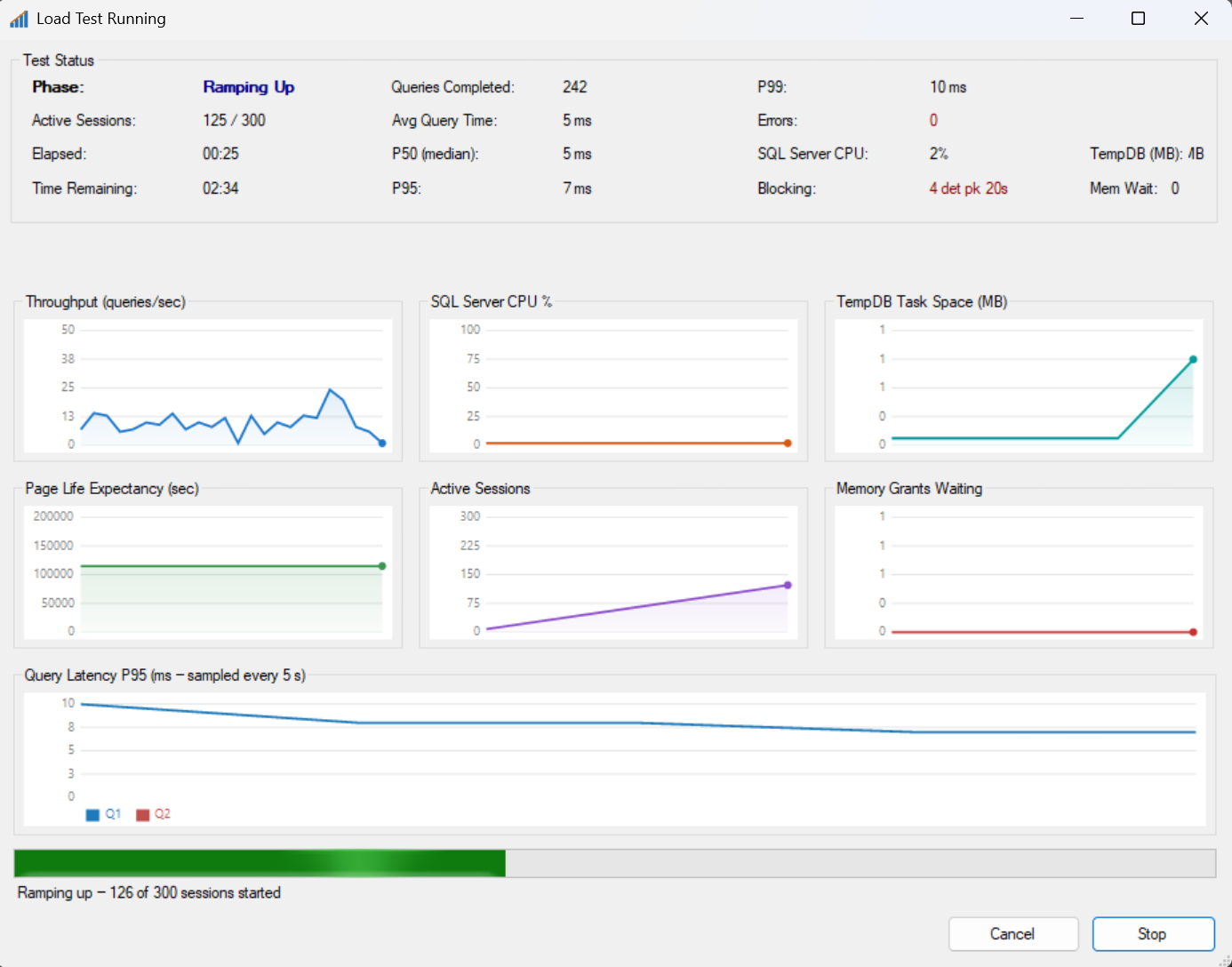
The progress window shows live charts for throughput, CPU percent, Page Life Expectancy,active sessions, TempDB task space, memory grants waiting, and P95 latency. Watch thenumbers settle once ramp-up finishes and the test reaches full load.
Step 6: Read the report
When the test finishes, click Show Results. You get a full HTML report: average, P50, P95,and P99 query times, error count, wait statistics, blocking events, file I/O, index usage,and missing index recommendations – all from the same few minutes of load.
Now do it again, on purpose
The real value shows up the second time: bump sessions to 20, or add a second query with adifferent weight, or load a CSV of real parameter values instead of running the same rowevery time. Each run is a comparison point against the last one.
Ten minutes from now you could have a real answer to a question you have been guessing atfor months. Download Database Health Monitor, including Query Loading Ramp, atDatabaseHealth.com.
Query Loading Ramp – part of Database Health Monitor, by Steve Stedman, Stedman Solutions, LLC – www.stedmansolutions.com
Check out this offer:Explore our Database Health Monitor special pricing.
Here are all the discounts for Database Health Monitor. Pick the one that fits your server count.
25% off 1 Instance – Code: 25OFF1
25% off 10 Instances – Code: JULY25
25% off 20 Instances – Code: 25OFF20 – Best Value
Free Backup and Restore Course when You Purchase Database Health Monitor
Purchase a new one-year Database Health Monitor subscription during the fourth week of July and receive our SQL Server Backup and Restore Course free of charge. Backups are your last line of defense when disaster strikes, but many organizations don’t discover problems until they need to perform a restore. This course walks through backup strategies, recovery models, restore techniques, and best practices to help ensure your data is protected and recoverable when it matters most. Pairing strong backup practices with the monitoring capabilities of Database Health Monitor gives you greater confidence in the health and resilience of your SQL Server environment. A $39.99 value included free with your purchase.