SQL Server Load Testing Tool: Query Loading Ramp

July is Database Health Monitor Month!
July has arrived, and it’s time to turn our attention to the heartbeat of our digital world – our databases! As the founder of Database Health and Stedman Solutions, I’m thrilled to proclaim this month as Database Health Monitor Month! This is our annual chance to celebrate the unsung heroes safeguarding our precious data and to explore the intricate web of data structures and relationships within our systems. Let’s take a closer look at their health, uncover hidden issues, boost performance, and ensure our data highways are running seamlessly. This July, let’s commit to not just keeping our databases operational, but ensuring they thrive at peak performance!
This month also marks the anniversary of Database Health Monitor. To celebrate, I’m excited to offer 25% off the licensing fee for the annual subscription to Database Health Monitor. Don’t miss this opportunity to enhance your database management!
Query Loading Ramp is a Windows desktop application for SQL Server load testing. It lets you write a T-SQL query and then hammer a SQL Server instance with that query across many simultaneous connections, simulating real-world concurrent user load. You configure the number of concurrent sessions, a ramp-up period (so connections are added gradually rather than all at once), and a total run duration — then the app takes care of spinning up all the workers and keeping them running.
During the load run, the app tracks live statistics: total executions completed, average query duration, error count, and SQL Server CPU utilization (sampled from sys.dm_os_ring_buffers every 5 seconds). You can watch these metrics update in real time as the load climbs, which lets you observe how your query and server behave under increasing pressure. There’s also a configurable CPU safety ceiling — if SQL Server CPU exceeds your threshold, the run stops automatically to protect the server.
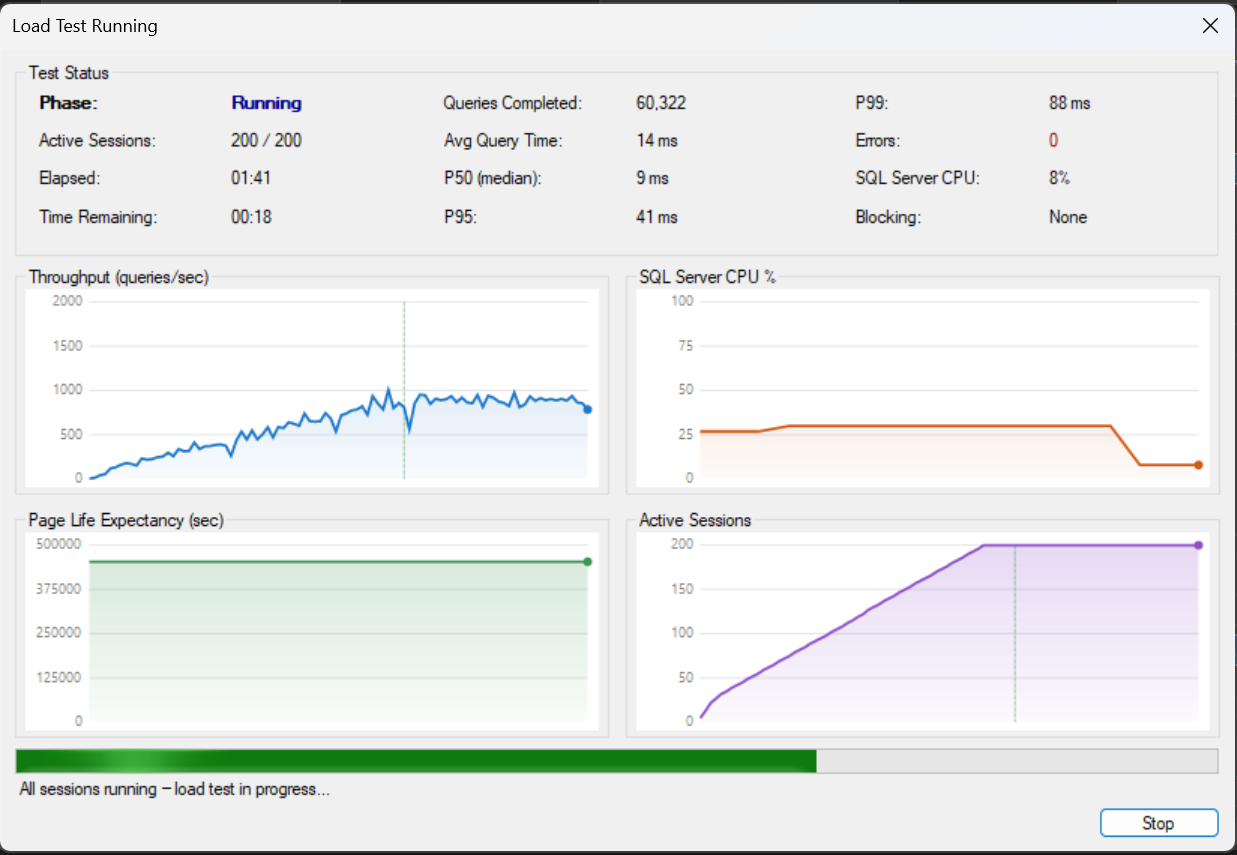
The app supports parameterized queries, so instead of running the exact same query every iteration, each worker can cycle through a set of parameter values loaded from a CSV file or pasted directly in. This makes the load much more realistic — you can drive thousands of unique WHERE clause values rather than letting the query plan cache turn everything into a trivial lookup.
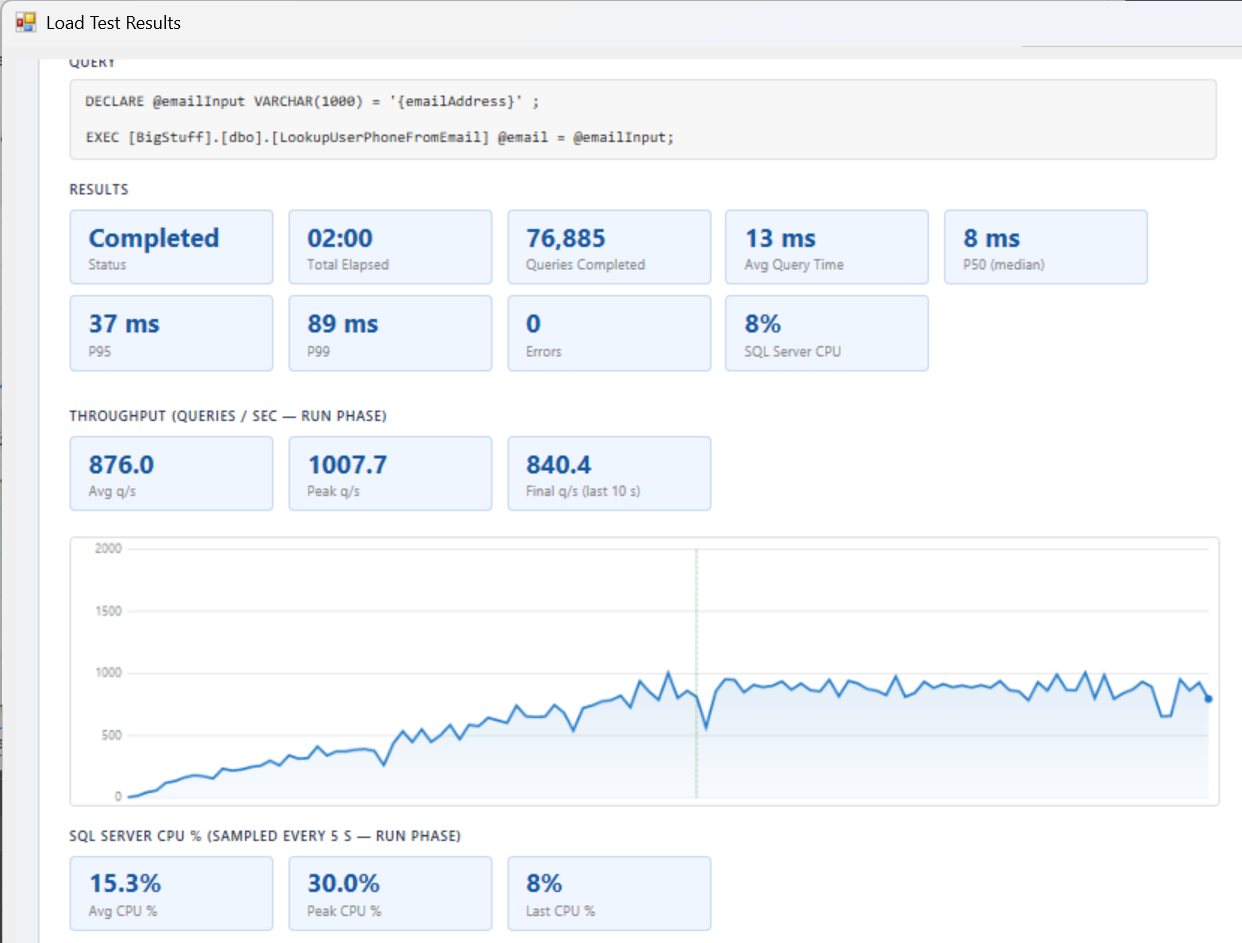
After a run completes, a results summary is shown with throughput, timing, and error statistics. Configurations (connection info, query, session counts, timing settings) can be saved to .qlr files and reloaded later, making it easy to repeat the same test against different servers or after schema changes.
Here is a short video showing how to use Query Loading Ramp for load testing on SQL Server. Query Loading Ramp is part of Database Health Monitor.
Check out this offer:Explore our Database Health Monitor special pricing.

Here are all the discounts for Database Health Monitor. Pick the one that fits your server count.
25% off 1 Instance – Code: 25OFF1
25% off 10 Instances – Code: JULY25
25% off 20 Instances – Code: 25OFF20 – Best Value
Free SQL Server Performance Tuning Course
During the second week of July, every new one-year Database Health Monitor subscription includes our SQL Server Performance Tuning Course at no extra charge. Learn proven techniques for identifying bottlenecks, analyzing waits, improving query performance, and resolving common SQL Server performance issues. Combined with the monitoring and diagnostic capabilities of Database Health Monitor, this course helps you move from simply identifying problems to solving them effectively. A $299.99 value included free with your purchase.
SQL Server Load Testing Features: Query Loading Ramp Summary
- Windows desktop application for SQL Server load testing
- T-SQL query execution across configurable concurrent sessions
- Ramp-up period and total run duration settings
- Live statistics for executions, query duration, errors, and CPU utilization
- Parameterized queries via CSV files or direct value input
- Results summary with throughput, timing, and error statistics
- Configuration saving to reusable .qlr files