Understanding Index Fragmentation in SQL Server (and How to Fix It)
Index fragmentation is one of those performance issues that tends to creep in quietly. You may not notice it right away, but over time it can lead to slower queries, increased I/O, and overall degradation in performance.
If your system feels like it is gradually slowing down without an obvious cause, fragmentation may be a part of the story.
What is Index Fragmentation?
At a high level, index fragmentation refers to how out of order the pages of an index have become. There are two main types. Internal fragmentation occurs when pages contain too much empty space, which leads to inefficient use of memory and disk. External fragmentation happens when pages are no longer in logical order, forcing SQL Server to jump around more during reads and increasing I/O. Both types can negatively impact performance, especially for large tables or heavily used indexes.
What Causes Fragmentation?
Fragmentation is usually the result of normal database activity, but a few patterns tend to accelerate it:
- Frequent INSERT, UPDATE, and DELETE operations
- Page splits when existing pages can no longer hold new data
- Workloads that rely on random inserts, such as GUID-based keys
In short, if your data is changing, fragmentation is building.
Why It Matters
Fragmented indexes make SQL Server work harder than it needs to. This often shows up as:
- Increased logical and physical reads
- Slower query performance
- Higher disk I/O
- Reduced cache efficiency
On larger systems, even moderate fragmentation can have a noticeable impact over time.
How to Measure Fragmentation
While SQL Server does provide ways to check fragmentation, the real challenge is quickly understanding what matters across an entire database without spending time writing and interpreting queries.
This is where having a centralized view becomes far more valuable. Instead of piecing together results manually, using a tool like Database Health Monitor allows you to immediately see fragmentation levels in context, making it easier to spot patterns, prioritize work, and take action faster.
Using the Fragmentation Report in Database Health Monitor
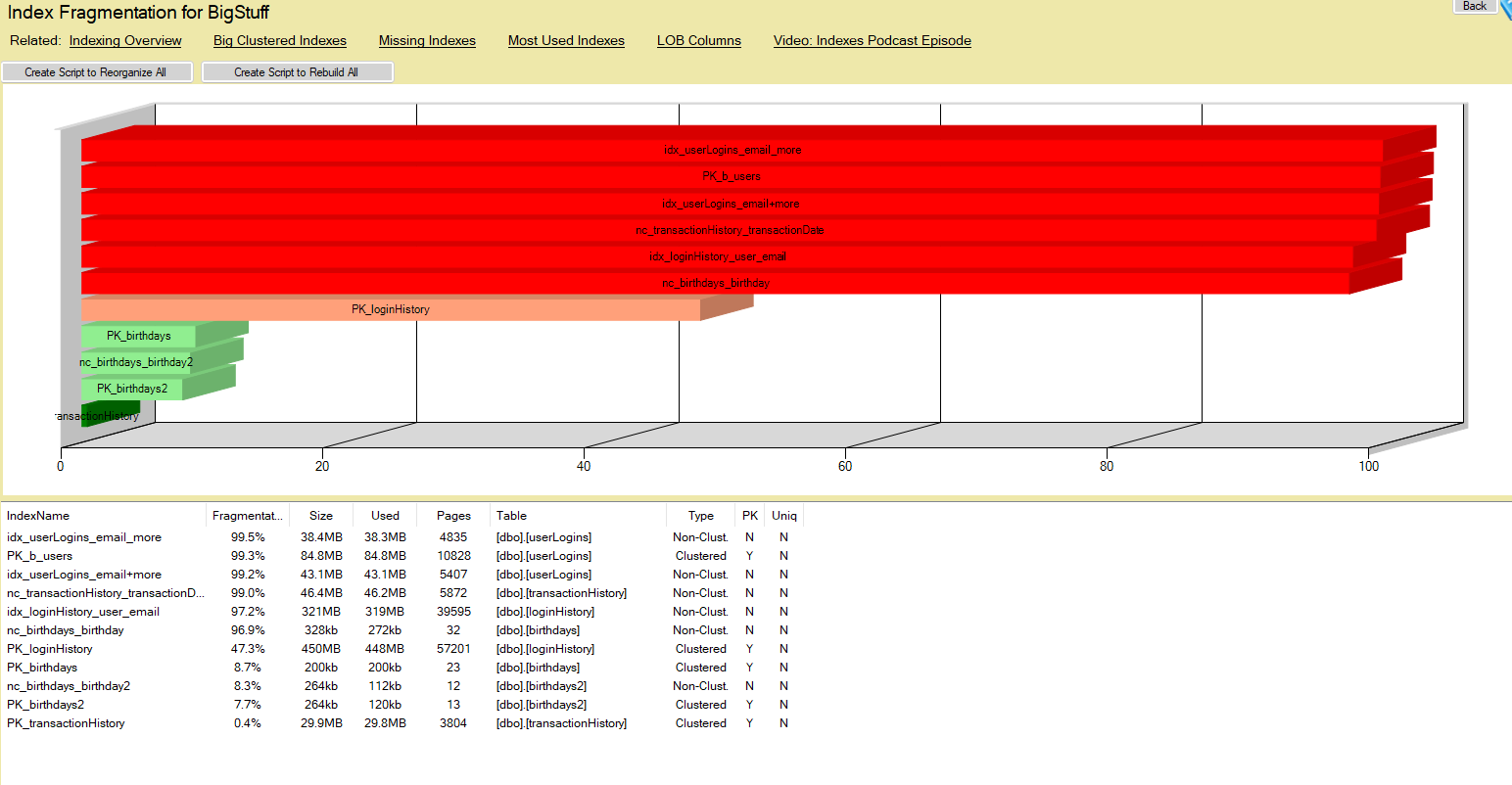
Database Health Monitor includes a built-in Fragmentation report at the database level, located under Real Time to Indexing to Fragmentation.
This report gives you a clear and immediate view of index health without needing to write or run manual queries. You can quickly see fragmentation levels across all indexes, identify the worst offenders, and prioritize maintenance efforts based on impact. It also helps you avoid over-maintaining indexes that do not actually need attention.
Instead of relying on one-off scripts or guesswork, you get a consistent and reliable view of fragmentation across your environment.
Using Automated Index Maintenance Jobs
Once you identify fragmentation, the next step is making sure it is handled consistently and efficiently without putting unnecessary strain on your system.
Rather than manually deciding when to reorganize or rebuild indexes, many environments benefit from automated maintenance solutions such as Ola Hallengren’s widely adopted IndexOptimize script. These jobs can:
- Evaluate fragmentation levels automatically
- Choose whether to reorganize or rebuild based on thresholds
- Run during scheduled maintenance windows
This approach reduces the need for constant manual intervention and helps ensure that fragmentation is addressed regularly while minimizing the impact on your server.
Avoiding Over-Maintenance
One of the biggest mistakes is performing index maintenance too aggressively or at the wrong time. Even automated jobs should be configured thoughtfully. Running them during off-peak hours, using sensible thresholds, and avoiding unnecessary rebuilds of large indexes can make a significant difference in overall system performance.
The Fragmentation report still plays an important role here by helping you validate that your maintenance strategy is working and by highlighting any indexes that may need special attention.
Best Practices
To keep fragmentation under control, focus on consistency and intention rather than volume. Regular monitoring, targeted maintenance, and thoughtful index design all contribute to better long-term performance. Choosing appropriate fill factors for heavily modified tables and avoiding unnecessary indexes can also help reduce how quickly fragmentation builds.
Putting It Into Practice
Index fragmentation is a natural byproduct of a busy database, but left unchecked, it can slowly degrade performance.
The key is not just fixing fragmentation, but understanding where it exists and taking the appropriate actions to manage it effectively.
The Fragmentation report in Database Health Monitor makes that process straightforward by giving you a clear picture of index health across your database, helping you spend time where it actually matters.