How Big Should master Be? What a Normal Size Is
The question usually arrives sideways. A volume alert fires, or somebody is planning a rebuild of the instance, and the thought is: how big should master be, and is ours normal? Nobody has a number. Setup leaves master at a few megabytes, and yours says something else.
How big should master be in SQL Server? On an instance where nobody has touched it, master is a few megabytes. A master near a hundred megabytes is holding someone's user objects, so the size is a finding rather than a quirk. The master Footprint report shows the file sizes, the used and free space, and which of its fixed properties to check.
The report that answers it in one screen is the master Footprint page in Database Health Monitor. Before you open it, it helps to know why the usual approach to this question gives you a poor answer.
The number everyone reaches for
Most people open the database properties, or run sys.master_files, and read one size. That figure is the size of the file. It is not the amount of data in it.
A file can be 70 MB with a third of it used. It can also be small and nearly full, with room to grow into a drive that has little left. One number cannot tell those apart, and the difference decides whether you do anything at all.
There is a second trap. master feels like a system database, so a large one gets blamed on the engine. It almost never is. A master that setup created and nobody touched is a few megabytes. One holding a hundred megabytes is holding somebody's data.
Measure three things instead
The honest reading splits each file into three parts: what is used, what is free inside the file, and what the file is still allowed to grow into. Two files matter here, the data file and the log. master is small enough that both fit on screen together.
Then you ask where it lives. Setup puts the data and the log for master on one volume, which is why the report states that in a header line rather than raising it as a problem. For a user database that same arrangement would be a finding. Here it is the default.
master Footprint is one of the reports in Database Health Monitor. It runs against your own servers, and it takes about a minute to have this same screen open on one of them.
What the report puts on screen
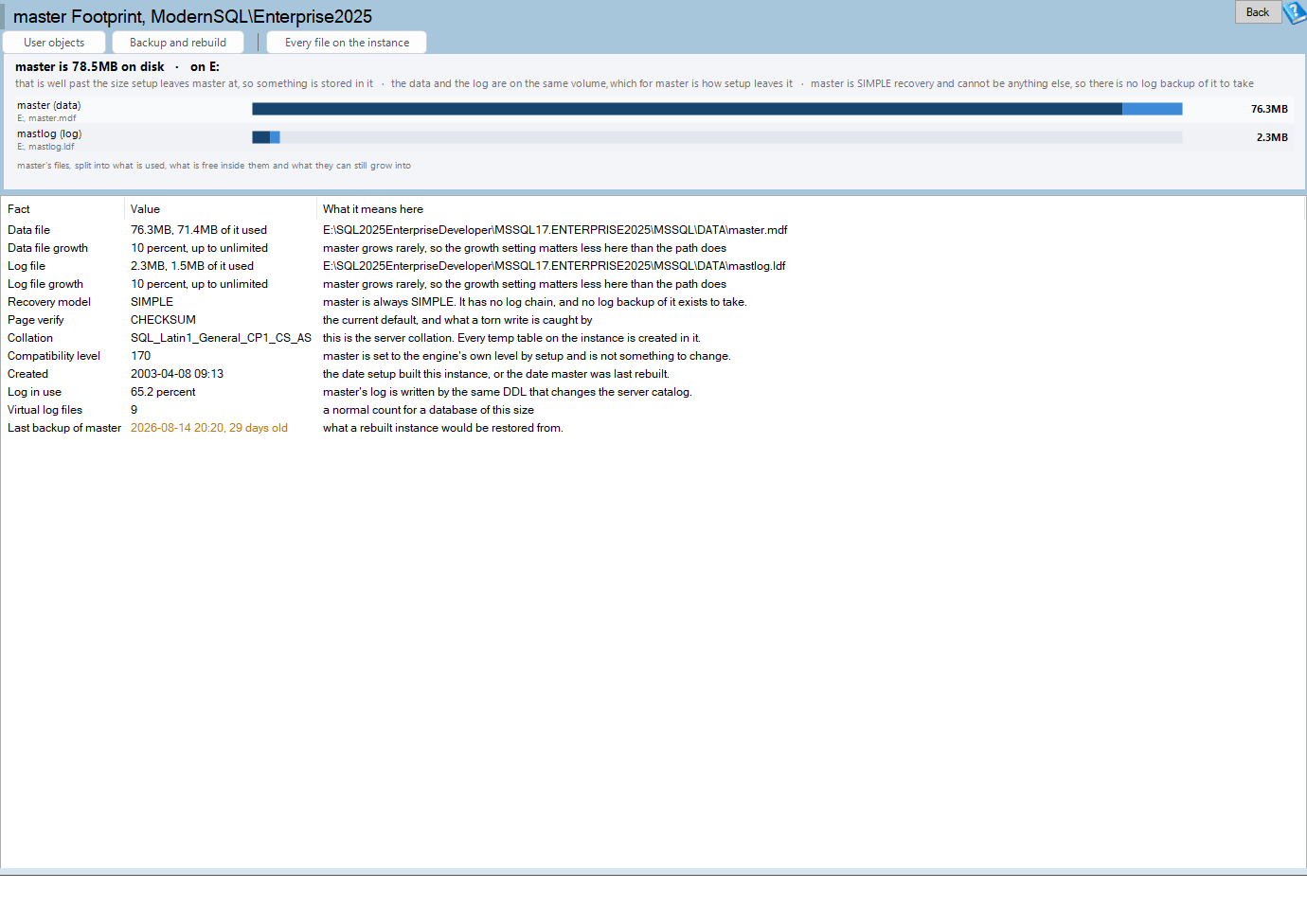
The page has two parts. At the top are two bars, one per file. Each bar is drawn dark for the used part, then free space inside the file, then the room the file can still grow into. The figure on the right is the size of the file, not the part in use, so read the dark section if you want to know how full it is.

The bars are interactive. Click one to select that file's line in the grid. Double click to open master User Objects. Right click for a menu with Copy this value, What is installed in master and Backup and rebuild readiness.
Underneath is the grid, with three columns: Fact, Value and What it means here. That last column is a sentence written for master specifically, not a generic description of the property.

The rows cover file sizes and paths, used and free space, recovery model, server collation, compatibility level, VLF count, log space used, the last backup, and a count of objects that setup did not create. That last count is the quick tell. If it is not zero, somebody put something in master.
Two facts that never change
Two rows are printed even though they cannot vary, because people assume the wrong thing about them.
- master is always SIMPLE recovery. You cannot change it. That means no log chain and no log backup, so the log backup panels you see for other databases are absent on this page, not empty.
- master defines the server collation. The value in the grid is the instance's, not master's own choice. Every database whose collation differs from it differs on purpose or by accident, and it is worth finding out which.
Why the VLF row may be missing
The VLF count comes from sys.dm_db_log_info, which needs SQL Server 2016 SP2. Log space used comes from sys.dm_db_log_space_usage, which needs SQL Server 2012. Naming either on an older build fails the entire batch at compile time, not just the one statement, so wrapping it in TRY would not help.
The report builds its query from the server version before sending it. On an older instance those rows are absent, with a note that says why. A missing row is the version, not a fault.
What to do with the answer
If master is a few megabytes, you are finished. Note the collation and move on.
If it is larger, the report has three exits on its toolbar. User objects opens master User Objects, which is what a large master usually is. Backup and rebuild opens master Backup and Rebuild Readiness, which tells you whether what is in there is protected. Every file on the instance opens master File Map.
The backup question matters more than the size. A master that holds user objects is a master you have to restore, and the last row of the grid tells you when that was last done.
The same habit applies to the other system database that tends to surprise people. If msdb is the one growing, read msdb Is Too Big? Here's What's Actually Filling It for the same split between file size and what is inside. The full reference for this page is in the master Footprint documentation.
What to check on your own server
- Open the master Footprint grid and read the Data file and Log file rows against the few megabytes an untouched master has
- Open master User Objects when master is far larger than that, and find out whose data it is holding
- Read the server collation row, then compare it with the collation of your user databases
- Check the last backup row for master, then open Backup and Rebuild Readiness if it is missing or old
- Look for the VLF count row, and note the SQL Server 2016 SP2 requirement if it is absent
Try Database Health Monitor Today
master Footprint shows how big master is, how much of it is used, and whether that size is normal, so a bloated master stops being a mystery. Database Health Monitor shows it on every instance you connect, in the time it takes to open the report.
Download Database Health Monitor and run the master Footprint report against your own server. There is nothing to configure first, and you will know inside a few minutes whether it tells you something you did not already know.