SQL Server Untrusted Constraint: Why Plans Quietly Rot
Your queries are slower than they were a year ago, nobody can say when it started, and there is no blocking, no odd wait type and no error in the log. One cause that fits that description exactly is a SQL Server untrusted constraint: a foreign key or check constraint the optimizer has quietly stopped believing.
What is a SQL Server untrusted constraint and why does it slow queries down? A SQL Server untrusted constraint is a foreign key or check constraint with is_not_trusted set to 1. It still enforces new writes, but the optimizer ignores it, so join elimination and predicate elimination stop. Fix it with ALTER TABLE WITH CHECK CHECK CONSTRAINT, which scans the table under a schema modification lock.
Database Health Monitor has a database-level report built for this one problem. Before the screen, though, it helps to see why the usual tools never raise it.
Why a constraint can be enforced and still be useless
A constraint does two jobs. It rejects bad writes, and it gives the optimizer a guarantee about the data. The second job is the valuable one for performance.
When SQL Server cannot prove that every existing row satisfies a constraint, it marks it with is_not_trusted = 1. Writes are still checked. Nothing fails. But the optimizer treats the constraint as if it were not there.
- Untrusted foreign key: the join to the parent table stays in the plan even when you select no column from it. On a wide view over a normalized schema, that is the biggest simplification the optimizer has, and it is switched off.
- Untrusted check constraint: the optimizer cannot notice that your
WHEREclause contradicts the constraint, so it cannot skip the table. Archive tables and partitioned views lean on this. Untrusted, every branch gets read.
Nothing on a dashboard moves. The cost is spread across every plan that touches the table, so no single query stands out.
The flag everyone checks, and what it leaves out
The usual move is to select from sys.foreign_keys and sys.check_constraints where is_not_trusted is set. That gives you a list. It does not tell you which items matter, and it mixes several different situations together.
- A constraint that is disabled is not enforcing at all, and the data behind it may already be wrong.
- A constraint marked
NOT FOR REPLICATIONis untrusted permanently, and no script will change that. - A trusted key with no supporting index on the child side passes the flag check, yet every parent delete pays for a scan of the child.
A bit reports a state. You need the consequence, and you need to know what fixing it will cost before you touch a production table.
Reading the SQL Server untrusted constraint report
Open a database in the tree and choose Untrusted Constraints. Every foreign key and check constraint is listed, trusted ones included, so you can see the denominator. Each row gets one of six verdicts, worst first.
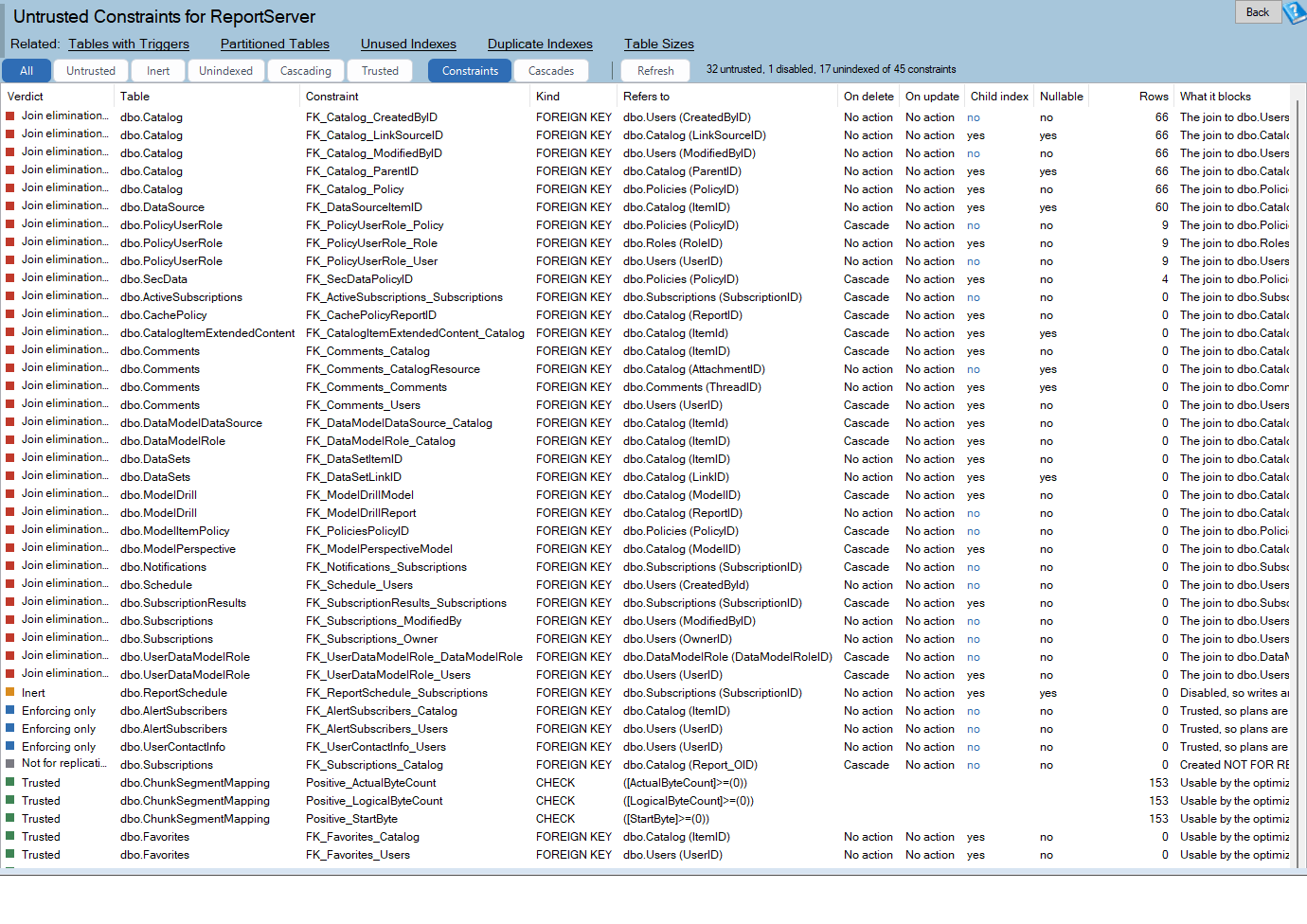
Untrusted Constraints is one of the reports in Database Health Monitor. It runs against your own servers, and it takes about a minute to have this same screen open on one of them.
| Verdict | What is missing |
|---|---|
| Join elimination lost | Enabled but untrusted foreign key. The parent join stays in every plan. |
| Predicate elimination lost | Enabled but untrusted check constraint. No contradiction detection. |
| Inert | Disabled. Not enforcing, not informing the optimizer, and bad rows may exist. |
| Enforcing only | Trusted, but the child side has no supporting index, so parent deletes scan. |
| Not for replication | Untrusted by design. Shown so counts reconcile, but never scripted. |
| Trusted | Fine. Kept visible as a baseline. |
The verdict names the specific optimization that is not happening. That is the difference between a flag and a finding.
The Nullable column
Trusting a key does not always bring inner join elimination back. For an inner join, the optimizer can drop the parent only if the child column is NOT NULL, because a nullable column means the join also filters rows. A left outer join needs trust and nothing else. So the grid shows Nullable, and a nullable key reads as left join elimination only, instead of promising a gain you will not see.
Enforcing only: a write cost you cannot see in the statement
This verdict is deliberately separate. The plan is fine. The trouble is that a delete on the parent has to prove no child row points at it. If no index leads with the foreign key columns, that proof is a scan of every child table. It shows up in the delete's execution plan, but nothing in the statement text hints at it, so the blame usually lands on the wrong query.
The report checks key_ordinal, so a key sitting third and fourth in a composite index does not count, and neither does a filtered index. That check is why it needs SQL Server 2008 or newer, where sys.indexes.has_filter exists.
Delete cascades nobody measured

A second view draws every ON DELETE CASCADE path as a node-link diagram. A cascade is typed once at table creation and rarely reviewed again. Each row of the diagram is a path from the table your delete names to the tables SQL Server visits on its own.
Labels on the arrows distinguish CASCADE, SET NULL and SET DEFAULT, because they are different amounts of work. An amber number on a node shows its fan out. Three deep and one wide is a chain. Three deep and forty wide at the second level is an incident waiting for a Tuesday.
The view does not invent a row count. That needs the data, not the catalog, so the right-click menu hands you a SELECT to run.
Re-checking is not free
The cure is one statement per constraint:
ALTER TABLE [dbo].[OrderLine] WITH CHECK CHECK CONSTRAINT [FK_OrderLine_Order];
It validates every row, and while it does, it holds a schema modification lock. Nobody reads or writes that table until it finishes. On a large table, schedule a window.
If any row already breaks the rule, you get error 547 and the constraint stays untrusted. That is most likely for disabled constraints, which have been unchecked for as long as they were off. It is not a bug. It is the finding. Fix the rows, then try again.
Each script the report generates carries a row count, a page count and a duration band, with the assumption behind the estimate printed beside it. If your storage is faster than the assumption, divide. Nothing on the page executes anything: scripts go to the clipboard, or open in a read-only window with no run button.
One more thing before you start. Constraints go untrusted for repeatable reasons: re-enabling with WITH NOCHECK, a bulk load without CHECK_CONSTRAINTS, and most restore and merge operations. If a weekly load untrusts the same constraint every Monday, a weekly re-check is treating the symptom. Change the load.
Where the numbers come from
Trust, disabled state and referential actions come from sys.foreign_keys and sys.check_constraints. Index support is worked out by joining sys.foreign_key_columns to sys.index_columns. Nullability comes from sys.columns. Row and page counts come from sys.partitions and sys.allocation_units, so the re-check estimate works without VIEW DATABASE STATE.
The write volume column does need that permission, and it reads sys.dm_db_index_operational_stats. Treat it carefully. Those counters are not cumulative since startup. A row appears when an object enters the cache and goes when it is evicted or the index is rebuilt, so two tables can have very different windows. The report says in at most the N days since for that reason. A zero means nothing was counted, not that it never happens.
Quick Scan reports two findings that lead here, Untrusted Foreign Keys and Untrusted Check Constraints, each as one row per database with a count. Both leave out NOT FOR REPLICATION constraints, so the number is one you can act on. For the full column reference, see the Untrusted Constraints documentation.
If plan quality is your worry, the same instinct applies in SQL Server Seek vs Scan: Why a Flat Read Count Lies: the damage is in what the plan does, not in a number that looks calm.
What to check on your own server
- Query sys.foreign_keys and sys.check_constraints for rows where is_not_trusted is 1 and is_disabled is 0
- Check whether each untrusted key column is NOT NULL before expecting inner join elimination to return
- Read the row count and page count before scheduling any re-check, because it holds a schema modification lock on the table
- Look for foreign keys whose child columns are not the leading columns of any unfiltered index
- Find the bulk load or restore step that untrusted the constraint before re-checking it again
Try Database Health Monitor Today
Untrusted foreign keys and check constraints make plans worse with no error, no wait and no alert, and this report names the optimization each one is costing you. Database Health Monitor shows it on every instance you connect, in the time it takes to open the report.
Download Database Health Monitor and run the Untrusted Constraints report against your own server. There is nothing to configure first, and you will know inside a few minutes whether it tells you something you did not already know.
Related reading: Scalar Function Performance: Read the Blocker Matrix First. A walkthrough of the report that sorts a database's scalar functions by what is blocking them, so one edit can be seen to fix a whole set.