Problematic Indexes
Indexes are one of the most powerful tools for improving query performance in SQL Server.When designed correctly they can dramatically reduce I/O, speed up queries, and improveapplication responsiveness.
However, indexes are not free. Every index adds overhead to INSERT, UPDATE, and DELETEoperations, increases storage requirements, and must be maintained over time.
Because of this, poorly configured, unused, or disabled indexes can create more harm thanbenefit. They consume storage, slow down write operations, and add unnecessary maintenancework without improving query performance.
Regularly reviewing indexes for potential problems should be part of any SQL Serverhealth check.
From Quick Scan to the Problem Indexes Report
When reviewing the Quick Scan results in Database Health Monitor you may notice two itemsrelated to indexing: Quick Scan Item 240 (Disabled Indexes) and Quick Scan Item 89(Low Fill Factor Indexes).
These checks are meant to quickly highlight indexes that may need attention. Quick Scantells you that a potential issue exists, but it is only the starting point. For deeperanalysis, you can open the Problem Indexes instance report in Database Health Monitor,which provides a detailed list of the affected indexes along with scripts to help resolvethe issues.
Disabled Indexes
A disabled index still exists in the database metadata, but SQL Server does not maintainit and the query optimizer cannot use it. In practice, the index is present but providesno performance benefit.
Disabled indexes often appear when an index was temporarily disabled for bulk operations,when someone intended to remove the index but never completed the cleanup, or when amaintenance process disabled the index and it was never rebuilt.
Because the structure still exists, disabled indexes consume storage and can createconfusion during troubleshooting. Someone reviewing the database may assume the indexis active when SQL Server cannot use it.
Low Fill Factor Indexes
Fill factor controls how full index pages are when the index is rebuilt. A fill factorof 100 means pages are completely full, while a fill factor of 80 leaves roughly twentypercent of the page empty.
Lower fill factors are sometimes used to reduce page splits in indexes that experiencefrequent inserts or updates. The extra space allows SQL Server to insert rows withoutsplitting pages.
However, extremely low fill factors can introduce inefficiencies. They increase storageusage, expand the number of pages SQL Server must read, and increase memory consumptionin the buffer pool. This can also lead to larger backups and longer restore times.
The Problem Indexes Report
Once Quick Scan identifies these conditions, the Problem Indexes instance report inDatabase Health Monitor provides a centralized view of the affected indexes. The reportsummarizes indexes with low fill factors and disabled indexes across the database andpresents them in an easy-to-review format.
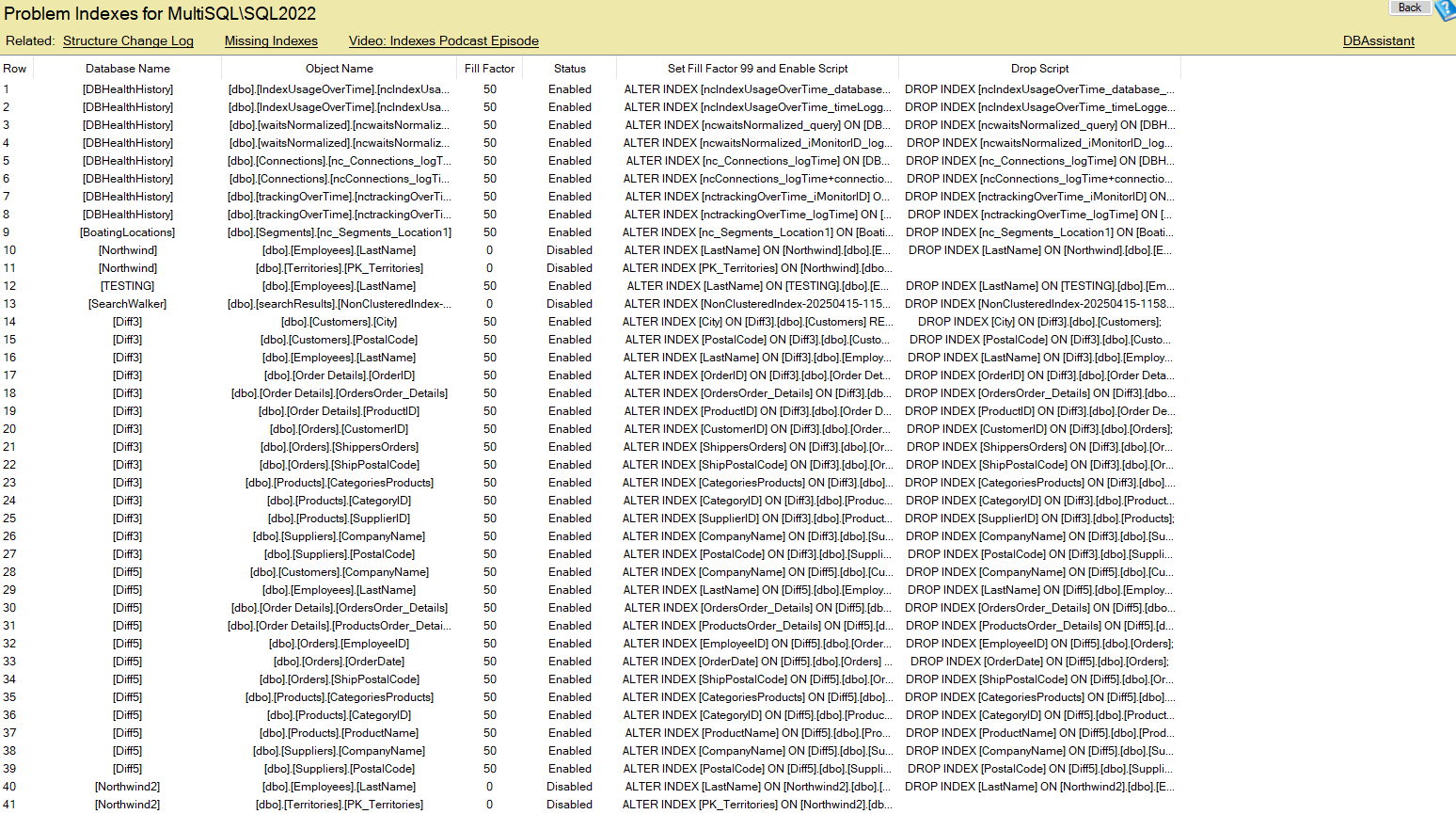
In addition to identifying the indexes, the report includes scripts that allow you totake action directly. Depending on the situation, you can rebuild an index to correctits fill factor, re-enable a disabled index, or drop an index that is no longer needed.
Using Quick Scan to detect potential issues and the Problem Indexes report to investigateand resolve them makes it much easier to keep your indexing strategy clean and efficient.
Additional Index Issues to Watch For
When reviewing the performance impacts of indexing on your SQL Server, there are severalother types of problematic indexes that are worth watching out for:
- Duplicate indexes
Multiple indexes that contain the same key columns in the same order. These waste storageand increase write overhead because SQL Server must maintain each index. - Overlapping indexes
Indexes that share similar columns where one index could potentially replace another. - Unused indexes
Indexes that are rarely or never used but still slow down INSERT, UPDATE, and DELETEoperations. - Heavily Fragmented Indexes
Fragmentation can increase I/O and reduce scan efficiency when it becomes excessive. - Wide indexes
Indexes with many columns or large included columns that consume large amounts ofstorage and memory. - Too many missing index implementations
Blindly implementing every suggestion from missing index DMVs can result in excessiveindex counts and overlapping indexes.
Keeping Indexes Healthy
Regularly reviewing indexes helps ensure your database performs efficiently.
Tools like the Problem Indexes report in Database Health Monitor make it easier toidentify disabled indexes and low fill factors.
Combining these reports with additional analysis of duplicate, unused, and fragmentedindexes can significantly improve database performance and reduce maintenance overhead.