Stay Ahead of SQL Server Problems with Database Health Monitor Email Alerts

One of the most frustrating parts of managing SQL Server is when issues creep up silently in the background—until they suddenly cause downtime or performance problems. Wouldn’t it be better to know about those issues before they become emergencies?
That’s where email alerting in Database Health Monitor helps proactively monitor your systems, so you can take action before disaster strikes.
Why Email Alerts Matter
SQL Server issues rarely happen out of nowhere. There are usually early warning signs—backup jobs falling behind, CPU usage creeping up, or queries running longer than normal. Email alerts help you spot those warning signs immediately, giving you the chance to resolve problems before they escalate into outages, slowdowns, or data loss.
With Database Health Monitor’s Email Alerting, you don’t have to spend all day staring at dashboards. Instead, you’ll get the right information at the right time, delivered straight to your inbox.
Key Features
Here are some of the ways Email Alerting helps you stay in control:
- Customizable Alerts – Choose the conditions that matter most to you, like query timeouts, failed logins, or low storage.
- Multiple Recipients – Send alerts to your whole team so no one is left out of the loop.
- Configurable Triggers – Fine-tune exactly when alerts are sent, and prevent unnecessary noise.
- Alert Duplication – Create different versions of the same alert for different thresholds or audiences.
Alerts You Can Count On
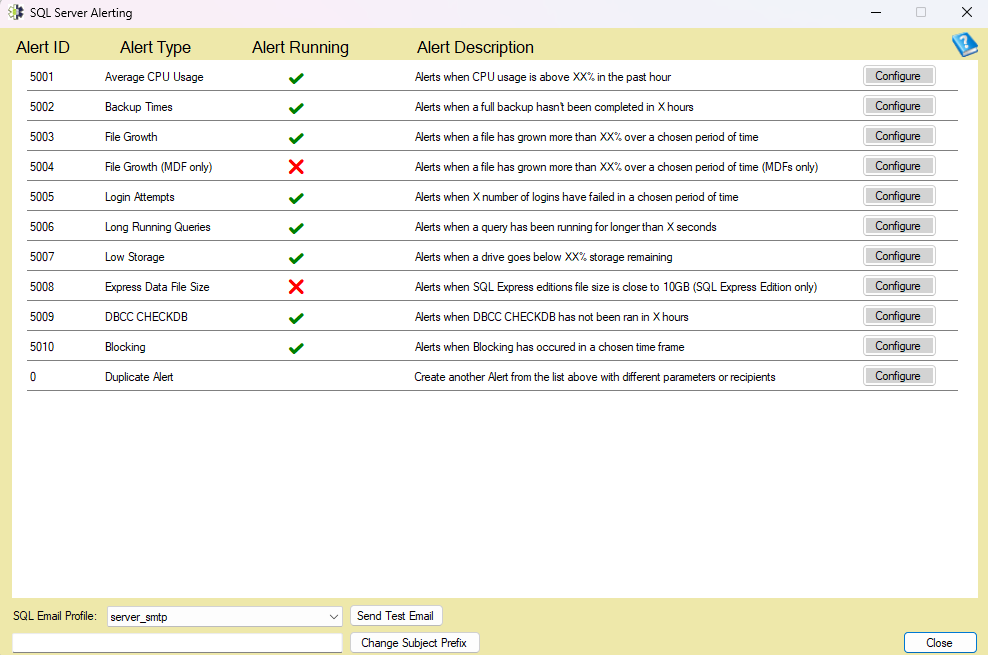
Database Health Monitor comes with a checklist of built-in alerts designed to cover the most common issues SQL Server administrators face. Some examples include:
- Average CPU Usage – Be notified when CPU usage stays too high for too long.
- Backup Times – Get alerted if a full backup hasn’t been completed within your desired window.
- File Growth – Catch excessive file growth before it eats up disk space.
- Login Attempts – Monitor failed login attempts to detect potential security issues.
- Long Running Queries – Stay on top of queries that could be dragging down performance.
- Low Storage – Receive alerts when a drive’s free space drops too low.
These alerts are designed to give you peace of mind by focusing on the problems that matter most.
Easy to Set Up
Setting up email alerts in Database Health Monitor is straightforward. Once you configure Database Mail in SQL Server, you can open the alert configuration manager, test your settings with a sample email, and then customize alerts to fit your environment.
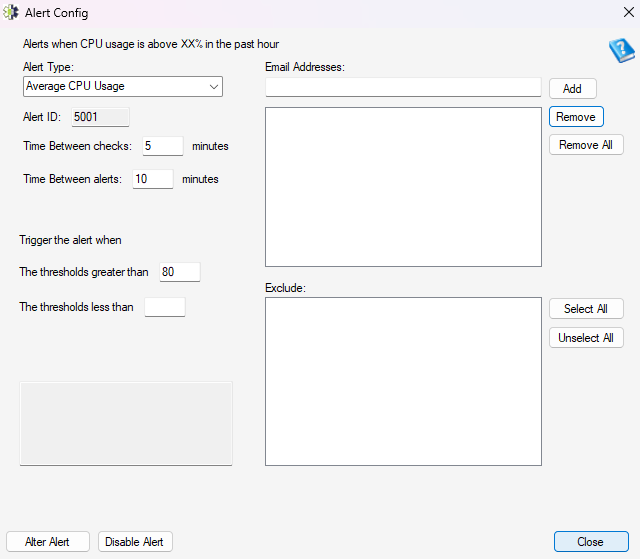
Within minutes, you’ll have a proactive monitoring system keeping an eye on your servers and letting you know when action is needed.
Take Control of SQL Server Health
Database Health Monitor’s Email Alerting feature helps you shift from reactive firefighting to proactive management. Instead of being caught off guard by performance issues or missed backups, you’ll know about them immediately and be ready to respond.