Introducing the TempDB Allocation Report in Database Health Monitor
When SQL Server performance dips, TempDB is one of the first places to check. The TempDB Allocation report gives you clear, historical visibility into how TempDB space is used so you can spot issues before they affect users.
See what’s happening inside TempDB
TempDB can be considered SQL Server’s “scratch pad.” It is used by nearly every workload on your server, but until now understanding how that space was being used often required digging through DMV queries or relying on guesswork.
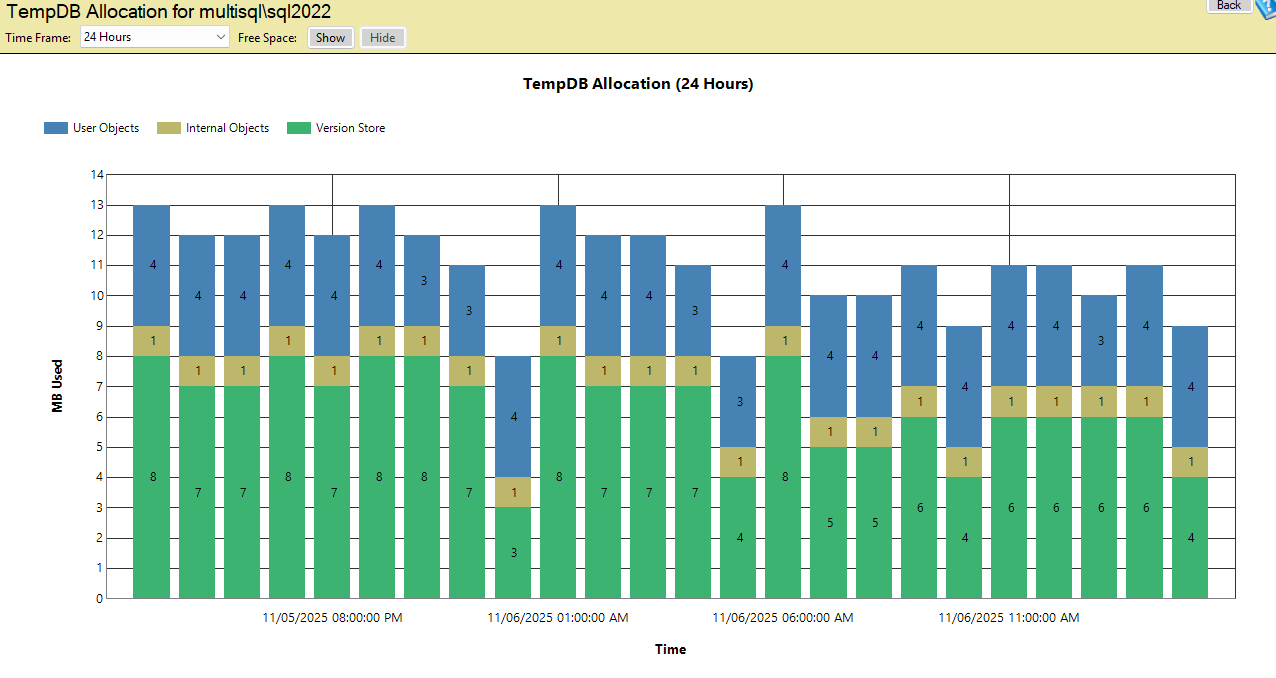
The TempDB Allocation report separates TempDB usage into three key categories:
- User Objects — Temporary tables and variables created by user queries.
- Internal Objects — Worktables, sorting, hashing, and other internal SQL Server operations.
- Version Store — Space used by snapshot isolation, triggers, and online index operations.
Spot trends before they become problems
This is a historical report that shows trends over time rather than a single snapshot. You can view TempDB usage for the past 24 hours, 48 hours, 7 days, or 30 days to identify patterns such as:
- Gradual growth in a category that points to inefficient queries or objects not being cleaned up.
- Spikes in Version Store usage that coincide with long running transactions or snapshot isolation usage.
- Repeating patterns that reveal workload cycles or scheduled jobs that affect TempDB.
The report includes an optional Free Space view. Use this to see whether TempDB has consumed all available free space and had to grow. Tracking free space over time helps you determine if TempDB sizing needs to be adjusted.
Why it matters
TempDB issues can be a very common cause of performance slowdowns in SQL Server. Without clear visibility into how TempDB is used, it is easy to miss warning signs until they start affecting users. The TempDB Allocation report helps you diagnose pressure on TempDB, make smarter sizing choices, and prevent space-related slowdowns.
Get the full picture with Database Health Monitor
The TempDB Allocation report is included with Database Health Monitor. If you want deeper visibility into TempDB and many other performance areas, Database Health Monitor puts historical insights and actionable data at your fingertips so you can fix problems faster and plan with confidence.