Seven Most Popular Features of Database Health Monitor
July is Database Health Monitor Month!
July has arrived, and it’s time to turn our attention to the heartbeat of our digital world – our databases! As the founder of Database Health and Stedman Solutions, I’m thrilled to proclaim this month as Database Health Monitor Month! This is our annual chance to celebrate the unsung heroes safeguarding our precious data and to explore the intricate web of data structures and relationships within our systems. Let’s take a closer look at their health, uncover hidden issues, boost performance, and ensure our data highways are running seamlessly. This July, let’s commit to not just keeping our databases operational, but ensuring they thrive at peak performance!
This month also marks the anniversary of Database Health Monitor. To celebrate, I’m excited to offer 25% off the licensing fee for the annual subscription to Database Health Monitor. Don’t miss this opportunity to enhance your database management!
Database Health Monitor provides comprehensive SQL Server performance management tools that surface query slowdowns and resource conflicts quickly, helping administrators resolve issues before they impact users.
Among its many capabilities, seven features stand out as the most popular with database professionals. These tools deliver targeted insights into wait statistics, index health, deadlock patterns, missing indexes, and query execution, helping teams maintain reliable and efficient database environments.
- Query Loading Ramp:
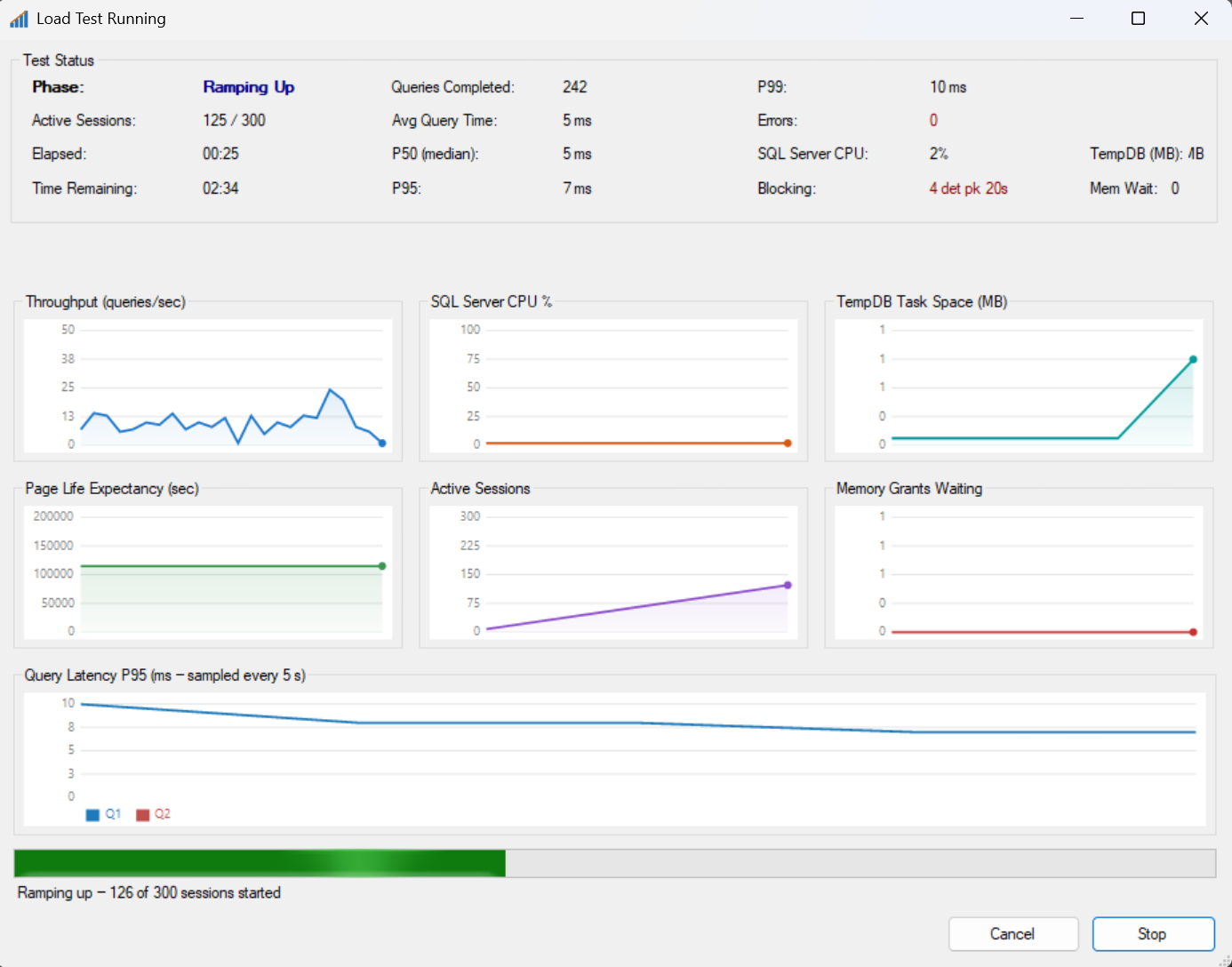
Query Loading Ramp is a Windows desktop application for SQL Server load testing. It lets you write a T-SQL query and then hammer a SQL Server instance with that query across many simultaneous connections, simulating real-world concurrent user load. You configure the number of concurrent sessions, a ramp-up period (so connections are added gradually rather than all at once), and a total run duration — then the app takes care of spinning up all the workers and keeping them running.
- Wait Stats Monitoring:
Quickly identifies performance bottlenecks by analyzing SQL Server Wait Statistics, helping you resolve issues before they impact users.

- Index Fragmentation Analysis:
Detects Fragmented Indexes that can slow down your queries, with recommendations for rebuilding or reorganizing them to maintain optimal performance.

- Deadlock Analysis:
Automatically captures and analyzes deadlocks, providing clear insights to resolve these conflicts and prevent them from recurring.

- Missing Index Recommendations:
Identifies missing indexes that could significantly improve query performance, offering actionable suggestions to optimize your database.

- Query Performance Monitoring:
Monitors slow-running queries and provides detailed execution plans, enabling you to fine-tune your queries for maximum efficiency.
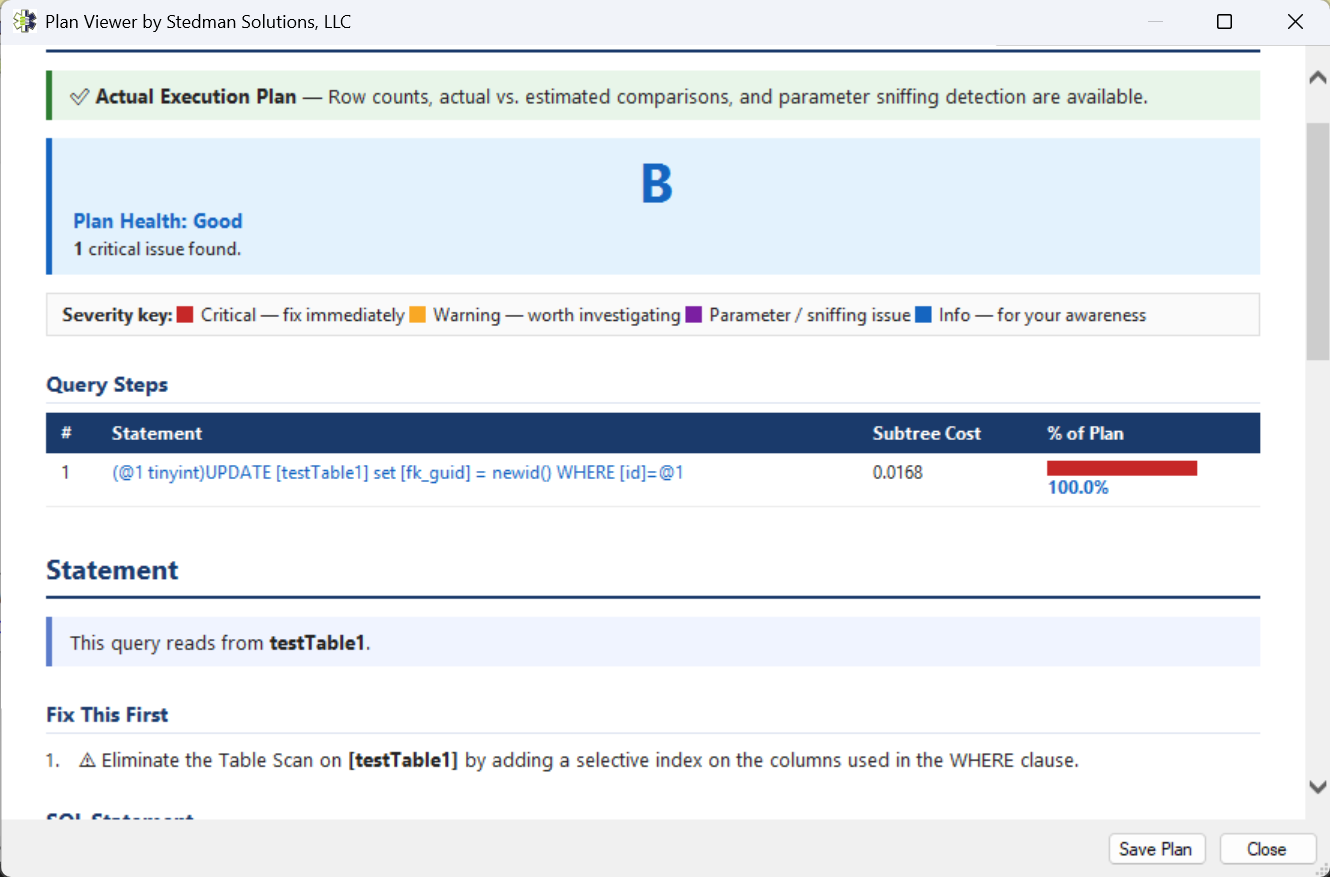
- Plan Viewer:
Query Plan Details Explained.
These features make Database Health Monitor an indispensable tool for maintaining and optimizing your SQL Server environment.
Take control of your SQL Server Performance—download Database Health Monitor today and start monitoring your databases with confidence.
Check out this offer:Explore our Database Health Monitor special pricing.
Here are all the discounts for Database Health Monitor. Pick the one that fits your server count.
25% off 1 Instance – Code: 25OFF1
25% off 10 Instances – Code: JULY25
25% off 20 Instances – Code: 25OFF20 – Best Value
Free SQL Server Performance Tuning Course
During the second week of July, every new one-year Database Health Monitor subscription includes our SQL Server Performance Tuning Course at no extra charge. Learn proven techniques for identifying bottlenecks, analyzing waits, improving query performance, and resolving common SQL Server performance issues. Combined with the monitoring and diagnostic capabilities of Database Health Monitor, this course helps you move from simply identifying problems to solving them effectively. A $299.99 value included free with your purchase.
Summary for Database Health Monitor features
- SQL Server performance management with attention to query slowdowns and resource conflicts
- Seven popular features for targeted insights into wait statistics and index health
- Query Loading Ramp Windows application for T-SQL load testing with configurable concurrent sessions
- Wait Stats Monitoring for quick identification of performance bottlenecks
- Index Fragmentation Analysis with rebuild or reorganize recommendations
- Deadlock Analysis for automatic capture and resolution of conflicts
- Missing Index Recommendations and Plan Viewer for query optimization